This vignette walks through the typical workflow for using the shewhartr package: pick a chart, fit it to historical data, inspect the result, deploy the limits prospectively. We use built-in synthetic datasets so everything is reproducible.
Five minutes, three charts
We will hit three of the most common chart types. Each follows the
same pattern: a constructor that takes data first, returns
an S3 object, and works with print() and
autoplot().
1. An I-MR chart on individual measurements
bottle_fill is a 100-point time series of bottle-fill
volumes. There is no natural rational subgroup (bottles are filled one
at a time), so the right tool is the Individuals and Moving Range
chart.
fit_imr <- shewhart_i_mr(bottle_fill, value = ml, index = observation)
fit_imr
#>
#> ── Shewhart chart I-MR (individuals & moving range) ────────────────────────────
#> • Observations / subgroups: 100
#> • Phase: "phase_1"
#> • Sigma estimate ("mr"): 1.179
#>
#>
#> ── Control limits ──
#> # A tibble: 6 × 3
#>   chart line   value
#>   <chr> <chr>  <dbl>
#> 1 I     CL    500.
#> 2 I     UCL   504.
#> 3 I     LCL   497.
#> 4 MR    CL      1.33
#> 5 MR    UCL     4.35
#> 6 MR    LCL     0
#> ── Rule violations ──
#>
#> ✔ No violations across 2 rules: "nelson_1_beyond_3s" and "nelson_2_nine_same".
The print method shows control limits for both panels (the I chart and the MR chart) and lists any rule violations. To see the chart:
autoplot(fit_imr)
#> Warning: Removed 1 row containing missing values or values outside the scale range
#> (`geom_line()`).
#> Warning: Removed 1 row containing missing values or values outside the scale range
#> (`geom_point()`).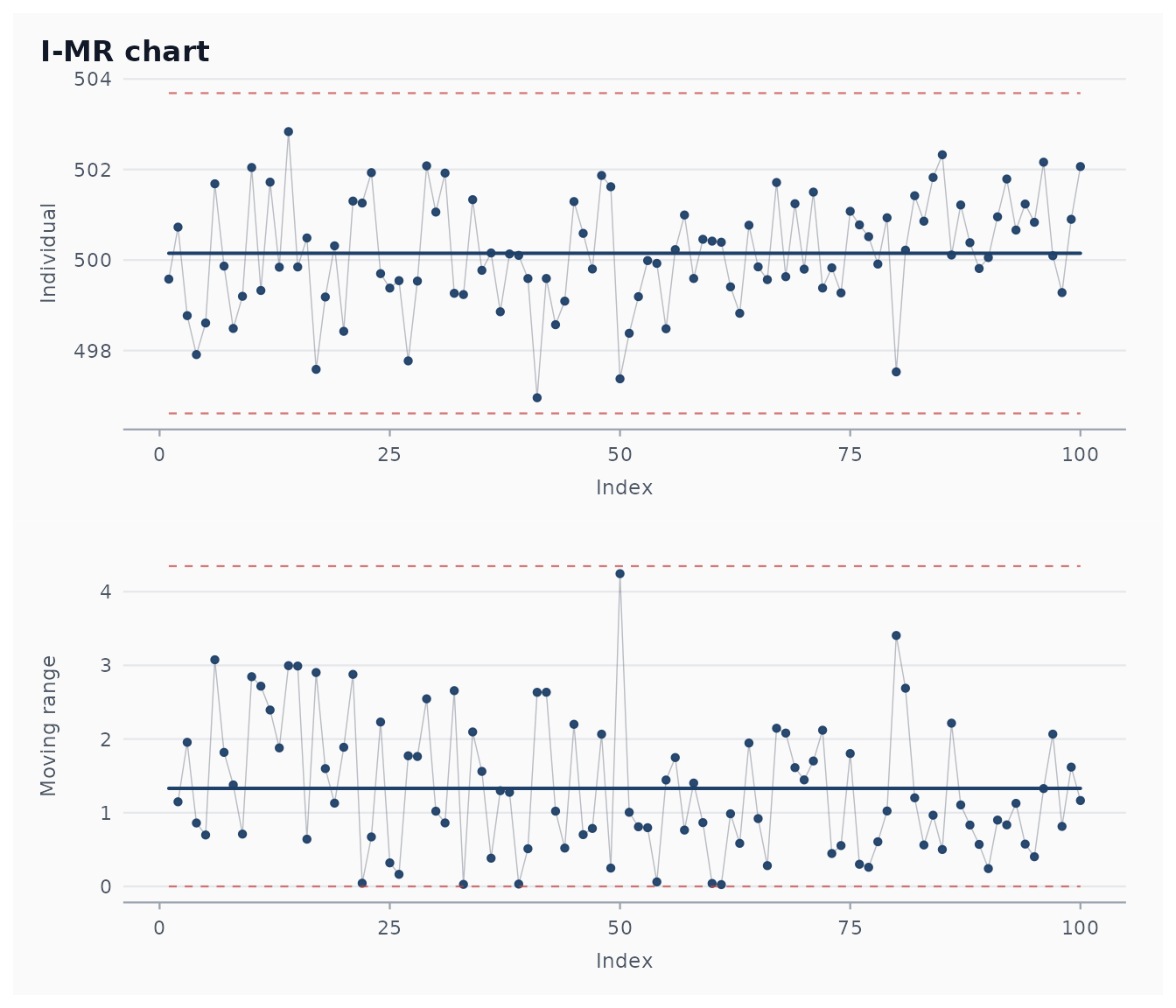
2. An Xbar-R chart on a subgrouped process
tablet_weight is a pharmaceutical weight dataset with 25
batches of 5 tablets each. The right tool is Xbar-R.
fit_xbar <- shewhart_xbar_r(tablet_weight,
                            value    = weight,
                            subgroup = subgroup)
broom::glance(fit_xbar)
#> # A tibble: 1 × 8
#>   type       n phase  sigma_hat sigma_method n_violations n_rules pct_violations
#>   <chr>  <int> <chr>      <dbl> <chr>               <int>   <int>          <dbl>
#> 1 xbar_r    25 phase…      1.52 range                   1       2           0.04
The Xbar chart limits use the constant
from Montgomery (2019, Appendix VI); see
?shewhart_constants if you need to inspect or extend the
table.
3. A c chart on defect counts
pcb_solder records the number of defective solder joints
on each of 50 inspected PCBs.
fit_c <- shewhart_c(pcb_solder, defects = defects, index = board)
#> Warning: c_bar = 5.76 is small; the normal approximation is poor.
#> ℹ Consider `limits = "poisson"` for exact limits.
broom::tidy(fit_c)
#> # A tibble: 3 × 3
#>   chart line  value
#>   <chr> <chr> <dbl>
#> 1 c     CL     5.76
#> 2 c     UCL   13.0
#> 3 c     LCL    0
For Poisson means below about 10, the normal approximation underlying classical 3-sigma c-chart limits is poor (the 3-sigma lower limit can even be negative). Box’s advice — don’t transform if you can model the right distribution — applies. Try:
fit_c_exact <- shewhart_c(pcb_solder, defects = defects, index = board,
                          limits = "poisson")
broom::tidy(fit_c_exact)
#> # A tibble: 3 × 3
#>   chart line  value
#>   <chr> <chr> <dbl>
#> 1 c     CL     5.76
#> 2 c     UCL   14
#> 3 c     LCL    0
Working with the result
Every chart object integrates with broom:
broom::tidy(fit_imr)            # control-limit summary
#> # A tibble: 6 × 3
#>   chart line   value
#>   <chr> <chr>  <dbl>
#> 1 I     CL    500.
#> 2 I     UCL   504.
#> 3 I     LCL   497.
#> 4 MR    CL      1.33
#> 5 MR    UCL     4.35
#> 6 MR    LCL     0
broom::glance(fit_imr)          # one-row diagnostic
#> # A tibble: 1 × 8
#>   type      n phase   sigma_hat sigma_method n_violations n_rules pct_violations
#>   <chr> <int> <chr>       <dbl> <chr>               <int>   <int>          <dbl>
#> 1 i_mr    100 phase_1      1.18 mr                      0       2              0
head(broom::augment(fit_imr))   # per-observation results
#> # A tibble: 6 × 14
#>   observation  .obs .value .center .sigma .upper .lower    .mr .mr_center
#>         <int> <int>  <dbl>   <dbl>  <dbl>  <dbl>  <dbl>  <dbl>      <dbl>
#> 1           1     1   500.    500.   1.18   504.   497. NA           1.33
#> 2           2     2   501.    500.   1.18   504.   497.  1.15        1.33
#> 3           3     3   499.    500.   1.18   504.   497.  1.96        1.33
#> 4           4     4   498.    500.   1.18   504.   497.  0.861       1.33
#> 5           5     5   499.    500.   1.18   504.   497.  0.698       1.33
#> 6           6     6   502.    500.   1.18   504.   497.  3.08        1.33
#> # ℹ 5 more variables: .mr_upper <dbl>, .mr_lower <dbl>,
#> #   .flag_nelson_1_beyond_3s <lgl>, .flag_nelson_2_nine_same <lgl>,
#> #   .flag_any <lgl>
The augment() output has .value,
.center, .sigma, .upper,
.lower, .flag_<rule> and
.flag_any columns, ready for downstream analysis or
alternative plotting.
Phase I and Phase II
A control chart serves two distinct purposes (Woodall 2000):
- Phase I — retrospective analysis on historical data, to identify out-of-control points and arrive at trustworthy in-control limits.
- Phase II — prospective monitoring of new data against those established limits.
The package draws this line in code via calibrate() and
monitor():
# Suppose the first 60 bottles are our calibration baseline,
# and the next 40 are new data we want to monitor.
baseline <- bottle_fill[1:60, ]
new_obs  <- bottle_fill[61:100, ]

calib  <- calibrate(baseline, value = ml, index = observation,
                    chart = "i_mr")
alarms <- monitor(new_obs, calib)
alarms$violations
#> # A tibble: 0 × 5
#> # ℹ 5 variables: position <int>, rule <chr>, description <chr>, value <dbl>,
#> #   severity <chr>
See the vignette phase1-phase2 for the full
discussion.
A roadmap for the rest of the documentation
- Variables charts: deeper dive into I-MR, Xbar-R, Xbar-S, with the underlying constants and choice of sigma estimator.
- Attributes charts: p, np, c, u, including the exact Poisson alternative for low-mean count data.
- Regression charts: the package’s flagship — control charts for trended processes.
- ARL by simulation: how to evaluate a chart’s operating characteristics for any rule combination.
- Diagnostics: the Tukey-style residual panel and the Box-Cox guidance step.
- COVID-19 case study: the original use case, now as a vignette.
References
- Montgomery, D. C. (2019). Introduction to Statistical Quality Control (8th ed.). Wiley.
- Woodall, W. H. (2000). Controversies and Contradictions in Statistical Process Control. Journal of Quality Technology, 32(4), 341-350.
- Box, G. E. P., & Cox, D. R. (1964). An Analysis of Transformations. Journal of the Royal Statistical Society B, 26(2), 211-252.